🚀 Now available on the App Store

Your DevOps Board, In Your Pocket

DevOps In is a lightweight Azure DevOps mobile client. Track work items, manage kanban boards, receive smart notifications, and capture bugs effortlessly — even when you are offline.
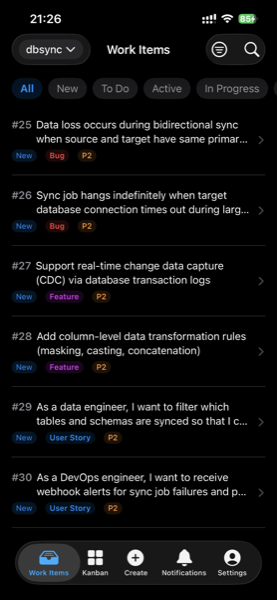
DevOps In App Screenshot

Everything You Need, On the Go

Designed for developers, PMs, and testers who need to stay connected with their DevOps projects from anywhere.

🔔

Smart Notifications

Priority-ranked notifications with swipe actions. @mentions and assignments appear at the top so you never miss what matters.

📋

Work Item Management

Full list and detail views for work items. Update status, assignee, and priority with just a few taps.

📊

Kanban Board

Drag-and-drop between To Do, Doing, and Done columns. Changes sync to Azure DevOps in real time.

Quick Capture

Capture bugs and requirements in seconds with voice transcription or camera. No more forgotten action items.

📡

Offline Support

Work without internet. Changes queue locally and sync automatically when the connection is restored. FIFO with conflict resolution.

🔍

Search & Multi-Project

Search work items by ID or keyword. Switch between projects with one tap and filter across the entire app.

Simple, Transparent Pricing

Reading is free. Subscribe to unlock write operations — update status, create items, and drag on the board.

Free

¥0
Forever free

Browse projects, view boards, read notifications

View boards & lists
Receive notifications
Search work items
Create & update items
Drag on kanban
Offline write queue

Frequently Asked Questions

DevOps In is a mobile client for Azure DevOps. It lets you view work items, manage kanban boards, receive push notifications, and quickly capture bugs or tasks — all from your iPhone. It is developed by Yunly (云狸).
Yes, the app is free to download and use for reading — you can browse projects, view boards, and receive notifications at no cost. Write operations (creating work items, updating status, dragging on the board) require a subscription starting at ¥8/month with a 7-day free trial.
When you lose internet connectivity, write operations are queued locally on your device. Once the connection is restored, the app automatically syncs all pending changes in FIFO order. You can also continue viewing cached data offline.
Absolutely. We use Microsoft Entra ID (Azure AD) OAuth2 for authentication. The app never stores your credentials. All network communication is encrypted via HTTPS. A biometric lock (Face ID / Touch ID) and screenshot blur protection keep your data safe on your device.
Open the app, go to the paywall screen, and tap "Restore Purchase". This will sync your Apple ID purchase history and reactivate your subscription on any device.
Currently, DevOps In supports one Azure DevOps organization at a time. Within an organization, you can switch between multiple projects seamlessly. Multi-organization support is being considered for a future release.